
Ergo Bank
Updated Fri September 25, 2026
Published Under: Cybersecurity
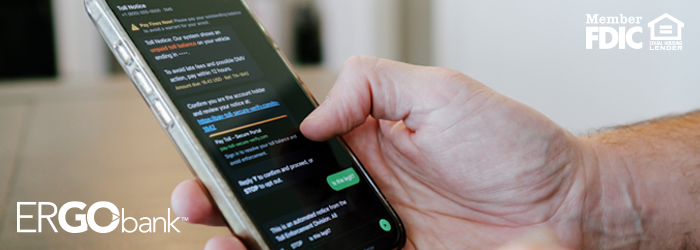
We get texts every day about deliveries, appointments, account alerts, and more. Scammers take advantage of that familiarity by sending fake messages that look legitimate. Two common examples are texts about unpaid tolls and missed package deliveries.
These messages often create urgency and ask you to click a link, make a small payment, or share personal information. Taking a moment to pause and verify the message can help protect your identity, payment information, and financial accounts.
What You Need to Know: An unpaid toll text or unexpected package-delivery text may ask you to click a link, pay a small fee, or provide sensitive information. Don’t click or respond. Instead, verify the request using an official website, app, or phone number you locate independently.
Why this matters in Wisconsin
In January 2026, the Wisconsin Department of Agriculture, Trade and Consumer Protection and the Wisconsin Department of Transportation warned consumers about a large wave of “final notice” toll scam texts falsely claiming to be associated with WisDOT. Wisconsin doesn’t have toll roads, although Wisconsin residents may encounter legitimate tolls when traveling in other states.
In This Article
What Is an Unpaid Toll Text Scam?
An unpaid toll text scam is a fraudulent message claiming you owe money for a toll. It usually directs you to a payment link designed to steal your card information, personal details, login credentials, or other sensitive information.
Scammers often impersonate toll agencies and use urgent language. The message may claim an unpaid balance could result in late fees, legal action, or problems with your driving privileges if you don’t pay immediately.
A fake toll notice might include:
- A “final notice” about an unpaid balance
- A link to a supposed payment portal
- A warning that immediate action is required
- A request for card or banking information
- Threats of larger penalties if you don’t respond
These messages often request a small amount that may not immediately raise suspicion. They count on you being uncertain about whether you passed through a toll area during a recent trip.
Traveled out of state recently? The Wisconsin DMV scam warning reminds residents that Wisconsin doesn’t have tolls. If you’re concerned you owe a toll from another state, contact that state’s tolling agency using a website or phone number you locate yourself. Don’t use the link or contact information in the unexpected text.
What Is a Package Delivery Text Scam?
A package delivery text scam is a fraudulent message claiming there’s a problem with a delivery. The text may ask you to click a link to reschedule delivery, pay a fee, correct an address, or track a shipment.
Scammers may pretend to be:
- USPS
- UPS
- FedEx
- DHL
- Amazon
- Another shipping or retail company
The text may claim:
- Your package couldn’t be delivered
- Your address needs to be verified
- A delivery or customs fee is due
- You need to schedule redelivery
- A tracking update requires immediate action
Good to know: The United States Postal Inspection Service says USPS customers must first request tracking for a specific package before receiving USPS tracking texts, and USPS doesn’t charge for package tracking. If you receive an unsolicited USPS delivery text with an unfamiliar link, don’t click it. Visit the carrier’s official website or app separately instead.
Red Flags That Can Reveal a Scam Text
Toll and package scams often use similar tactics. Knowing the patterns can help you spot suspicious messages more quickly.
Unexpected Urgency
Scammers want you to act before you have time to question the message. Watch for phrases such as:
- “Final notice”
- “Immediate action required”
- “Payment due today”
- “Account penalties will apply” or “your account will be suspended”
- “Your package will be returned”
A sense of urgency doesn’t automatically prove a message is fraudulent, but it’s a reason to pause and verify it independently. Most legitimate organizations provide multiple ways to address an issue and generally don’t use threatening text messages as their only form of communication.
Suspicious Links
Fraudulent links may appear convincing at first glance. Be cautious if:
- The web address contains misspellings
- The URL includes random letters or numbers
- The sender uses a shortened link
- The domain doesn’t match the organization’s official website
- The message asks you to sign in or enter payment information
Instead of using the link, open the company’s verified app or type its official website address into your browser.
Unexpected Payment Requests
A request for a small toll, delivery, processing, or redelivery fee may feel harmless. However, the scammer may be more interested in capturing your card details and personal information than in the amount requested. Verify the charge through the organization’s official website, app, or customer-service number before paying.
Requests for Sensitive Information
Don’t provide any of these through an unexpected text:
✕ Social Security number
✕ Driver’s license number
✕ Online banking credentials
✕ Debit or credit card information
✕ PIN
✕ Password
✕ One-time security code
Unusual Wording or Mistakes
Some scam texts contain misspellings, strange sentence structures, or inconsistent capitalization. However, a polished message can still be fraudulent. Don’t rely on grammar alone. Focus on the unexpected request, suspicious link, pressure to act, and request for private information.
What You Should Never Do When You Receive a Suspicious Text
If a message catches you off guard, slow down before doing anything.
✕ Don’t click links. A scam link may lead to a fake payment or login page designed to collect your information.
✕ Don’t reply. Even replying “STOP” may confirm that your phone number is active. If the message appears fraudulent, report it, block the sender, and delete it.
✕ Don’t share personal information. Never send account numbers, passwords, PINs, security codes, Social Security numbers, or card information through an unexpected text.
✕ Don’t send payment. Verify any toll, delivery, or processing fee through a trusted source before entering payment information.
✕ Don’t assume a familiar name makes the message real. Scammers can impersonate recognizable companies and government agencies. A company name or logo alone isn’t proof that the message is legitimate.
Think a Message Might Affect Your Bank Account?
Call us using the number on our website or visit a nearby branch. We’d rather help you verify a message before you respond.
What to Do If You Already Clicked the Link or Shared Information
If you clicked a suspicious link, don’t panic. Stop interacting with the page, then work through these steps.
Close the page
Stop entering information and close the website immediately.
Change affected passwords
If you entered login credentials:
- Change the affected password immediately
- Change it anywhere else you reused it
- Turn on multifactor authentication when possible
- Start with your email password if your email account may be affected
Review your accounts
Check your:
- Bank account activity
- Debit and credit card transactions
- Payment apps
- Email login activity
- Credit reports, if personal identifying information was exposed
Look for transactions, password resets, or account changes you don’t recognize.
Contact your financial institution
If you entered card, banking, or personal information, contact your bank or card provider promptly. We can help review your account, discuss available security measures, and walk through appropriate next steps.
Check your device
If you downloaded a file or application, update your device software, remove suspicious applications, and run the security tools available on your device.
Report the message
See the reporting options below.
How to report a scam text
The FTC recommends using your phone’s “report junk” feature or forwarding an unwanted text to 7726, which spells SPAM. You can also report the incident through the FTC fraud-reporting website.
For a USPS-related text, follow the reporting instructions from the United States Postal Inspection Service.
Wisconsin residents can also review the DATCP consumer alert and reporting resources.
Related Reading
How We Help Customers Stay Safe From Fraud
Protecting your financial information is a priority for us. If you receive a suspicious text, notice unusual account activity, or have questions about a message that claims to be from Ergo Bank, we’re here to help.
A few habits can reduce your risk:
- Verify requests through official websites or apps
- Avoid links in unexpected texts
- Never share sensitive information or verification codes by text
- Use multifactor authentication when it’s available
- Review your accounts regularly
- Set account and transaction alerts
- Contact us directly whenever something feels off
Our fraud and security tips also explain what we’ll never request if we call you directly and how tools such as CardHub may help you monitor and manage debit card activity.
Not Sure a Message Is Really From Us?
Don’t respond using the information in the message. Contact our team or visit an Ergo Bank location using information you know you can trust.
Frequently Asked Questions
How do I know whether an unpaid toll text is legitimate?
Don’t use the link in the message. Contact the appropriate tolling agency through its official website or a verified phone number. Wisconsin doesn’t have toll roads, but residents who recently traveled in another state should verify concerns directly with that state’s tolling agency.
Is a package delivery text always a scam?
No. Legitimate carriers can send tracking notifications. Be cautious when a message is unexpected, contains an unfamiliar link, or asks for payment or personal information. Open the carrier’s official app or website separately to check the shipment.
What is smishing?
Smishing is phishing conducted through text messages. Scammers send deceptive texts to persuade recipients to click malicious links or provide personal and financial information.
What should I do after clicking a scam text?
Stop interacting with the website, change affected passwords, monitor accounts, contact impacted organizations, and report the incident if necessary.
Should I reply STOP to a scam text?
It’s generally safer not to reply to a message you believe is fraudulent. Report it through your phone or carrier, block the sender, and delete it.
Can scam texts steal banking information?
Yes. Scammers may attempt to collect account credentials, debit card numbers, online banking usernames, passwords, or verification codes through fraudulent websites.
Where can I report scam text messages?
Use your phone’s “report junk” option or forward the message to 7726. You can also report fraud through the FTC, the organization being impersonated, your mobile carrier, or Wisconsin DATCP.